

Modern applications need more than just a database. They need authentication, auto-generated APIs, file storage, and real-time subscriptions. Supabase is a powerful open-source Firebase alternative that transforms PostgreSQL into a complete backend platform. With its developer-friendly SDKs and instant API generation, Supabase is a top request from teams who want full control over their infrastructure without sacrificing speed.
Today, we’re excited to announce native support for Supabase templates on the DigitalOcean App Platform. Deploy a production-ready Supabase backend with one click, complete with managed PostgreSQL, authentication, REST API, file storage, and real-time capabilities.
Benefits
- Instant Backend: Get authentication, auto-generated REST APIs, file storage, and real-time subscriptions without writing backend code.
- Production-Ready Security: Every deployment includes JWT authentication, Row Level Security (RLS), and secure credential management out of the box.
- Self-Hosted Control: Keep your data, auth credentials, and file storage on infrastructure you control—no vendor lock-in.
- Full-Stack Ready: Deploy Supabase alongside your frontend application in a single App Platform project.
Architecture Overview
The Supabase template deploys a complete backend stack that auto-generates APIs from your PostgreSQL schema. Your frontend applications connect through four specialized services that handle data, authentication, files, and real-time updates.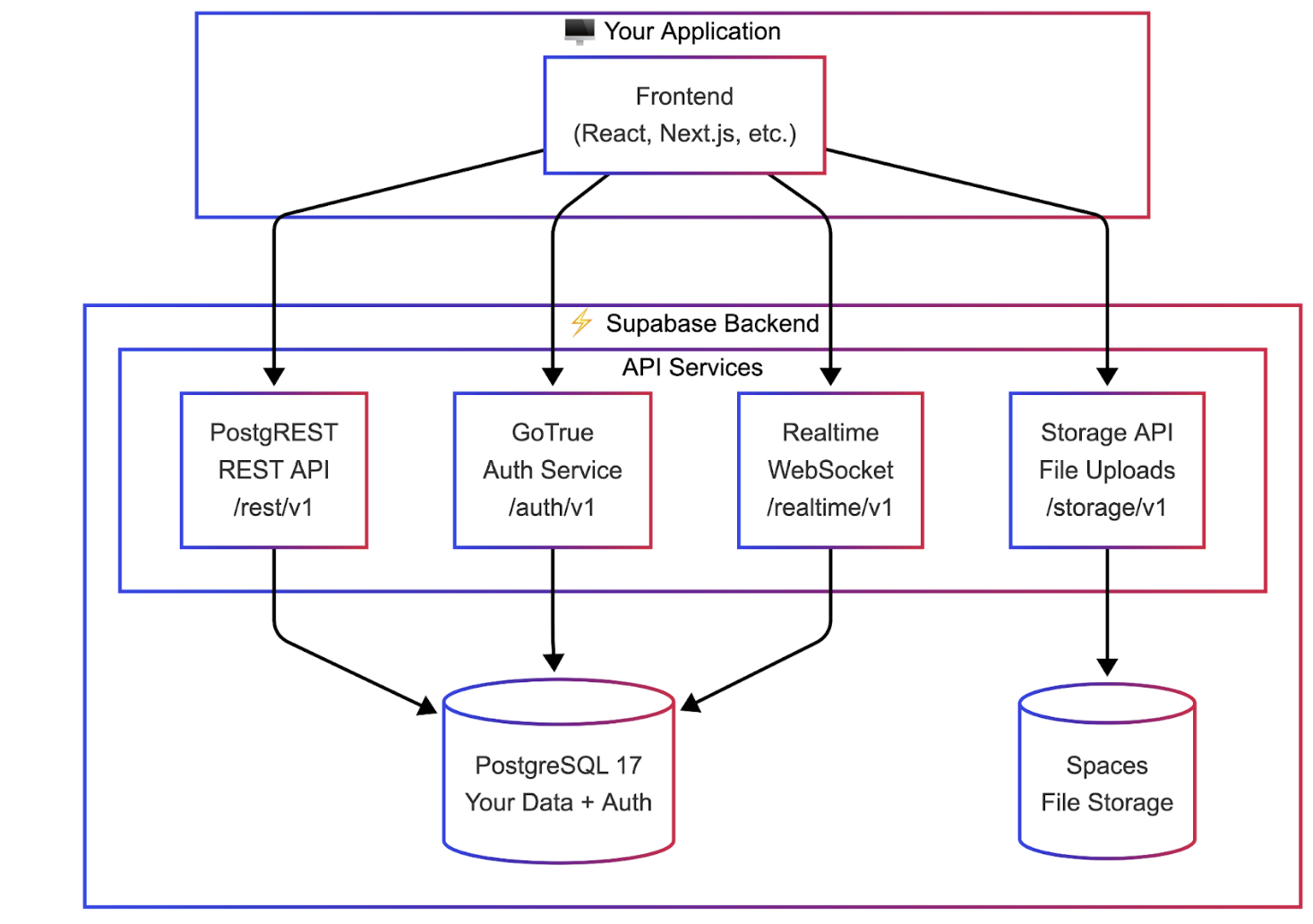
How Supabase Works
Unlike traditional backends where you write API endpoints manually, Supabase auto-generates them from your database schema:
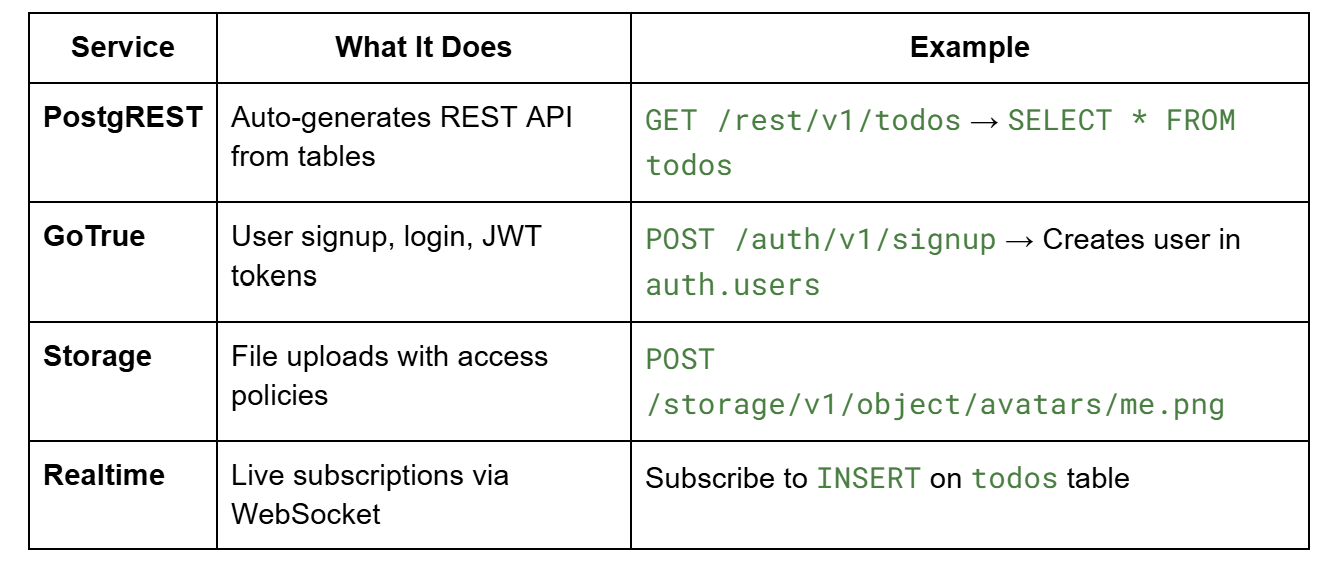
Row Level Security (RLS) policies on your tables control who can access what - users only see their own data, automatically.
How to Get Started
The template repository contains everything you need to deploy Supabase on App Platform:
github.com/AppPlatform-Templates/supabase-appplatform
You have three deployment paths:
- One-Click: Use the Deploy to DigitalOcean button in the repository for instant deployment
- Console or CLI: Fork the repo and deploy via the DigitalOcean Control Panel or doctl CLI
- AI-Assisted: Use an AI coding assistant with App Platform Skills for guided, full-stack deployments
Deploying with AI Assistants
AI assistants can deploy your complete stack—Supabase backend plus your frontend application—in a single workflow. We recommend using DigitalOcean App Platform Skills. Clone the skills repository to your assistant’s skills directory:
Verify your assistant has access by asking: “Do you have access to DigitalOcean App Platform skills?”
Then use a prompt like:
The assistant will create a detailed plan covering database setup, RLS policies, frontend configuration, and deployment - then execute each step with your approval.
What’s Included
- PostgREST for auto-generated REST APIs from your schema
- GoTrue for email/password authentication and JWT tokens
- Storage API for file uploads to DigitalOcean Spaces
- Real-time for WebSocket subscriptions on database changes
- PostgreSQL 17 with pre-configured roles (anon, authenticated, service_role)
- Database initialization with auth helper functions and RLS support
For database management, use any PostgreSQL client (pgAdmin, DBeaver, psql) or run Supabase Studio locally for a visual interface.









0 Comments